
What Should You Know First?
- DHCP Option 6 carries one or more IPv4 DNS server addresses; it does not prove that clients use them successfully.
- Option 6, Option 15, Option 81, DDNS, and DHCPv6 DNS options solve different problems.
- Validate policy, DHCPACK content, endpoint state, resolver reachability, and real query behavior.
- ZDNS DHCP distributes the configuration while ZDNS DNS provides the recursive service behind those addresses.
A correct value in the scope is only the first checkpoint. The client path is successful only when the endpoint receives the list and can resolve through every advertised server.
DHCP Option 6 tells an IPv4 client which Domain Name System servers are available for recursive resolution. It carries one or more IPv4 addresses, listed in order of preference according to RFC 2132. The option looks simple, but its operational effect is broad: a client can receive a valid IP address and gateway yet still fail to reach applications if the DNS server list is wrong, unreachable, stale, or inconsistent with the network's security and forwarding design.
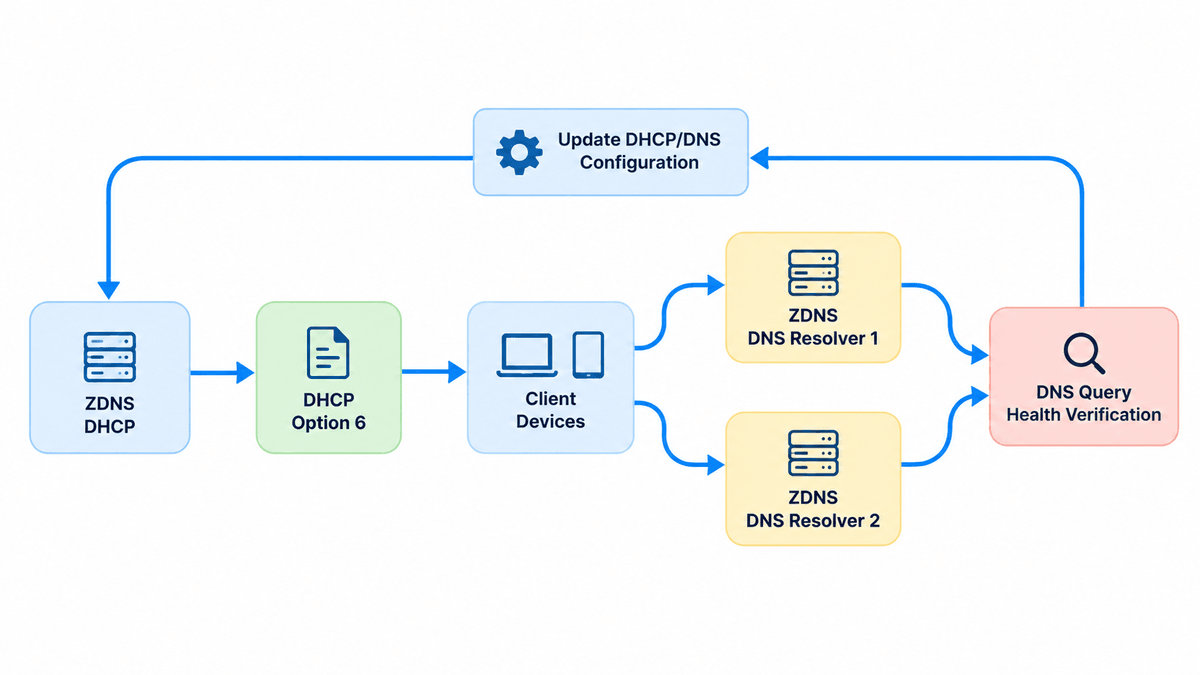
ZDNS DHCP supports standard and custom DHCP options, unified configuration management, large-scale configuration modules, transaction visibility, and DDNS. ZDNS DNS provides enterprise recursive resolution, forwarding controls, link health monitoring, automatic failover, dual-stack optimization, access control, and protocol-security capabilities. Option 6 is the delivery mechanism that connects DHCP clients to the approved IPv4 resolver service; it is not the resolver service itself.
What Does DHCP Option 6 Send to a Client?
In a normal DHCP exchange, the server returns configuration in the DHCPACK after selecting a lease. Option 6 can contain multiple DNS server IPv4 addresses. The client installs that list according to its operating system and network-stack behavior. The option does not contain domain names for the resolvers, health status, transport policy, or a guarantee that every listed server is reachable. It simply communicates addresses.
The distinction matters during troubleshooting. Seeing the correct value in the DHCP scope proves that the server is configured, but not that the client requested, received, accepted, or is currently using it. A device may still hold an older lease, use a manually configured resolver, receive a policy from another interface, follow a VPN configuration, or apply local name-resolution rules. Validation must trace the value from policy to packet to endpoint and then through an actual DNS query.
How Are Option 6, Option 15, Option 81, and DDNS Different?
Option 6 provides DNS server addresses. Option 15 provides a domain name that can influence how a client forms or searches names. Dynamic DNS is a separate process that creates or updates DNS records as leases change. These functions interact, but configuring one does not automatically configure the others. A client can receive the correct resolver addresses while its hostname is absent from DNS, or it can register a record while using an unintended recursive resolver.
Keep the responsibilities explicit. DHCP distributes network parameters. The recursive DNS service answers client queries and applies forwarding, availability, and security policy. DDNS maintains selected records. ZDNS IPAM tracks the address plan and ownership. ZDNS supports DDNS updates from dynamic addressing into DNS, but operators should still define who updates forward and reverse records, when records are removed, and which DNS servers clients should use at each site.
Which Resolver Addresses Should Clients Receive?
List resolvers that the client can actually reach from its VLAN, site, or tunnel. Do not advertise a central address merely because it exists in a global standard if the branch loses access whenever the WAN is interrupted. Consider latency, forwarding design, security policy, IPv4 reachability, maintenance boundaries, and the failure domain shared by the listed servers. Two addresses located behind the same failed link do not provide useful client-side resilience.
The order should reflect the intended preference, but client implementations do not all behave identically. Some try the first server until it fails, some rotate, and some issue parallel queries. Therefore, every advertised resolver must be capable of answering the client's expected queries. ZDNS DNS link health monitoring and forwarding failover operate inside the resolver architecture, while Option 6 controls which resolver endpoints the client knows. Test both layers rather than treating multiple addresses as proof of end-to-end availability.
Which DHCP and DNS Controls Should You Keep Separate?
| Control | Purpose | Common mistake |
|---|---|---|
| Option 6 | IPv4 recursive DNS server addresses | Assuming list order guarantees identical client behavior |
| Option 15 | Domain name or connection-specific suffix context | Treating it as the resolver address |
| Option 81 | Client FQDN and dynamic-update coordination | Assuming it controls recursive resolution |
| DHCPv6 Option 23 | IPv6 recursive DNS server addresses | Trying to put IPv6 resolver addresses into IPv4 Option 6 |
| DDNS | Create or update forward and reverse DNS records | Assuming client resolver assignment creates DNS records |
RFC 2132 assigns code 6 to the Domain Name Server option and requires its length to be at least 4 bytes and a multiple of 4 because each IPv4 address is 4 bytes. Code 15 carries the domain-name option. DHCPv6 uses Option 23 for recursive DNS server addresses. These numbers represent separate protocol fields, not interchangeable settings.
Where Should You Configure DHCP Option 6?
DHCP settings can often be defined globally and overridden for a server, subnet, scope, class, reservation, or another policy object. Place Option 6 at the highest level that accurately represents the intended clients, then document deliberate overrides. A branch may need local resolvers, a guest network may need a restricted resolver path, and a migration subnet may temporarily use old and new services. Hidden inheritance can make two similar scopes deliver different results.
ZDNS DHCP unified configuration management and flexible configuration modules are valuable when the same resolver policy must be deployed at scale. Standardization should not erase site-specific reachability. Before rollout, inventory inherited and overridden values, confirm there is no conflicting option at a narrower level, and define a rollback value. Apply the change to a representative scope first, renew a controlled client, and verify behavior before expanding it across the enterprise.
- Confirm the resolver IPv4 addresses and intended preference order.
- Check reachability from every client subnet that will receive the option.
- Review global, server, scope, class, and reservation-level inheritance.
- Coordinate firewall, routing, forwarding, and DNS access-control policy.
- Define how long old leases may retain the previous resolver list.
- Prepare a tested rollback value before broad deployment.
How Do You Verify Option 6 on DHCP and the Client?
Begin at the source: confirm the effective option value for the client's scope or policy, not merely the global default. Review the DHCP transaction and, when necessary, capture the DHCPACK to see the Option 6 bytes delivered to the endpoint. Then inspect the active interface on the client. Renewing a lease is useful for a controlled test, but avoid forcing mass renewals without understanding the impact on address and authentication services.
Client validation should record the interface, lease server, lease acquisition time, DNS server list, search suffixes, and any static or VPN-provided settings. Multi-homed devices deserve special attention because Ethernet, Wi-Fi, cellular, and VPN interfaces can contribute different resolver policies. A support ticket that says only “DNS is wrong” is insufficient. The evidence should show which interface supplied the unexpected server and whether the value came from DHCP at all.
How Do You Test Resolver Reachability and Failover?
After confirming the list, send queries directly to each advertised resolver. Test an internal name, an external name if permitted, a nonexistent name, and a name that exercises the intended forwarding path. Measure whether the response comes from the expected service and whether policy is consistent. Then make the preferred resolver unavailable in a controlled test and observe how the client behaves. A correct Option 6 value can still produce poor user experience if the client waits too long before trying another server.
ZDNS DNS can monitor upstream forwarding server health, isolate faults, retry through a standby forwarder, or perform local recursion according to configuration. Those resolver-side mechanisms complement client-side redundancy. The client needs reachable resolver addresses; each resolver needs a resilient path to answers. Operations should monitor both DHCP delivery and DNS query success so that a lease change and a resolver failure do not become separate blind spots.
How Can a Branch Move Clients to ZDNS DNS?
A distributed enterprise is replacing legacy branch resolvers with ZDNS DNS. The team first deploys and tests the new recursive service, forwarding policy, access controls, and upstream health behavior. It then changes Option 6 for a pilot branch through ZDNS DHCP. Controlled clients renew their leases, show the new resolver list, and successfully resolve internal and external test names. Transaction logs establish which DHCP service delivered the change.
The migration proceeds in waves rather than assuming every client updates immediately. Long-lived leases retain the old list until renewal, while statically configured servers require a separate inventory and change plan. Monitoring compares query volume on old and new resolvers. Only after the expected client population has moved does the team retire the old service. This sequence connects configuration, endpoint adoption, and resolver behavior.
What If a Guest Scope Receives an Internal Resolver?
A guest Wi-Fi scope accidentally inherits the corporate resolver list. Guests can reach one resolver but receive policy and answers intended for managed endpoints; the second address is blocked by the guest firewall. The team identifies the inherited Option 6 value, creates a guest-specific resolver policy, and verifies both advertised addresses from the guest VLAN. ZDNS DHCP provides the option configuration and lease evidence, while ZDNS DNS applies the intended recursive controls.
The correction also checks existing leases. New clients receive the right list immediately, but connected guests may retain the old servers until renewal. The team monitors both DHCP assignments and DNS query sources during the transition. The incident demonstrates why scope-level intent, network reachability, and client adoption must be validated together.
How Do You Troubleshoot Wrong or Stale DNS Settings?
- Read the effective Option 6 value at the client's actual scope and policy level.
- Confirm the DHCPACK contains the expected IPv4 resolver addresses.
- Check whether the active interface has a static, VPN, or alternate configuration.
- Compare lease acquisition time with the time the option changed.
- Query every advertised resolver directly from the affected subnet.
- Inspect routing, firewall, and DNS access-control policy.
- Track old resolver query volume until migration is genuinely complete.
DHCP Option 6 is small, but it defines a critical part of the client path to applications. Reliable operation requires more than entering two IP addresses into a scope. ZDNS brings DHCP option delivery and enterprise DNS resolution into the same DDI portfolio, allowing teams to configure the intended path, verify what clients received, and test whether the resolvers behind those addresses remain usable.
What Do Network Teams Ask About DHCP Option 6?
Can DHCP Option 6 contain more than one DNS server?
Yes. RFC 2132 defines a list of IPv4 DNS server addresses in preference order. Client implementations decide how they use that list, so the second address is not a universal, immediate failover guarantee. Test Windows, Linux, mobile, VPN, and managed endpoint behavior against every resolver you advertise.
Why does a client still show the old DNS server?
The endpoint may still hold an earlier lease, inherit a narrower policy, use static interface settings, receive DNS configuration from a VPN, or prefer another active interface. Verify the effective DHCP policy and DHCPACK, then inspect the client interface that actually carries the query. A scope screenshot alone cannot prove endpoint state.
Does Option 6 configure DNS search domains?
No. Option 6 supplies IPv4 resolver addresses. Option 15 supplies a domain-name value, and other mechanisms can provide search lists depending on the platform. Keep resolver assignment, suffix behavior, and dynamic registration separate during design and troubleshooting so a correct setting is not credited with another control's outcome.
Can Option 6 advertise an IPv6 DNS server?
No. IPv4 Option 6 carries IPv4 addresses. DHCPv6 uses Option 23 to provide IPv6 recursive DNS server addresses, while router advertisements can also influence IPv6 resolver discovery in some networks. Validate the IPv4 and IPv6 paths independently or clients may bypass the resolver policy you intended to enforce.
How do I verify a DNS migration delivered through DHCP?
Confirm the effective option, capture the DHCPACK, inspect the active client interface, and query each advertised resolver directly. Then monitor old and new resolver traffic until long-lived leases and static configurations have moved. ZDNS DHCP transaction evidence and ZDNS DNS query behavior connect configuration rollout with actual client adoption.