
An IPv4 address in a log records an endpoint as seen by the system that wrote the event. To identify the device behind it, start with the event time and the network where the address was seen. Then look for the assignment that was valid at that moment and corroborate it with a second source. That answers a question a public lookup cannot resolve: which device likely used this address inside our organisation when the event happened?
A current lease, an asset name and a DNS result can point to different devices. Each describes a different observation. The fastest way to resolve the disagreement is to map every observation to a time, an address scope and the system that produced it.
Start with the observation
Record the source system, the original event time and the address field before searching other tools. An application log may show its immediate peer, which could be a load balancer. A resolver log may show the address from which a query arrived. A firewall record may show the address before or after translation, depending on the field and where the record was generated.
Write down whether the IPv4 address appears as a source, destination or translated address. Keep the original time zone and store a UTC copy for correlation. Distinguish the time an event happened from the time a collector received it. For instance, a record ingested at 10:05 could describe a connection observed at 09:47. Looking up the later time may return a valid lease for a different client.
If a log provides a site, interface, virtual network or firewall zone, keep it with the event. If it simply says “client IP,” ask the system owner how that field is populated before treating it as a device address.
Put the IPv4 address in the right network
An IPv4 address consists of 32 bits and is usually written as four decimal numbers separated by dots. A network prefix supplies the context that the address alone omits. The prefix, network segment and routing context matter when separate branches or cloud environments reuse private address space. The private address ranges in RFC 1918 can appear independently in multiple networks.
Suppose an internal event records 10.24.6.57. Two separate locations could both have a subnet numbered 10.24.6.0/24. A search that returns a match at headquarters tells you only that headquarters has a matching address. Use the source interface or site tag to identify the relevant network before accepting a match. If the log provides no site, check whether the log source serves a particular branch or records traffic from several locations.

An address plan can help narrow the search. Look up the prefix, the scope owner and the assignment policy in your IP address management system. Keep the planned assignment and the observed assignment as distinct fields. The scope owner can explain where to find the lease records or whether the network uses static assignments.
Find the assignment that covered the event time
For a dynamic IPv4 address, retrieve the historical lease from the service responsible for the relevant scope. Use the lease start, the renewal history and any recorded end or release to establish the interval. Dynamic assignment is time limited under the DHCP model described in RFC 2131. A later device can legitimately reuse the same address.
A reservation can narrow the search because it records a configured relationship between a client and an address. Check whether that reservation existed at the event time and whether a relevant lease or another observation supports it. For a static assignment, look for a change record or asset record dated close to the event. Ask the network owner what evidence would show that the interface was attached to that segment at the time.
Avoid searching just the active lease table when the question is historical. Ask which logs survive a lease expiry and whether an earlier allocation was captured before a configuration change. If the service retains only the active assignment, mark the historical lookup as incomplete and move to records with known retention. Use the enterprise DHCP overview to orient the discussion with the owner of the address assignment service.
Confirm what the assignment can prove
A lease ties an IPv4 address to the client information recorded by the DHCP service. Depending on how your environment is configured, a device inventory, network access log or managed endpoint record may help tie that information to a named asset. Use a second source whose observation does not simply copy the original record. Two dashboards that import the same lease establish one line of evidence.
A DNS name can be useful as a pointer. Check the record owner, when the answer was observed and whether the name is shared, aliased or maintained manually. A reverse DNS result can refer to a service or an old assignment. Record it as supporting context and verify the assignment using a source appropriate to that network.
When the event was recorded after address translation, check whether authorised translation logs preserve enough information to associate the observed connection with an internal address. Ask for the event time, protocol, ports and translation context. Where many connections share a public IPv4 address, the public address on its own generally cannot identify an internal device. If the intermediate system was a proxy, the relevant evidence may sit in the proxy logs and application records.
Work through a timed example
In this fictional example, an internal resolver records a query from 10.24.6.57 at 09:47 UTC. The resolver belongs to Branch A. A current lookup at 11:20 shows a tablet on that IPv4 address. Historical records show that a managed workstation held the lease from 08:00 to 10:00, and that the tablet took the address after 10:10. The active lease and historical lease give different names because the relevant time windows differ.
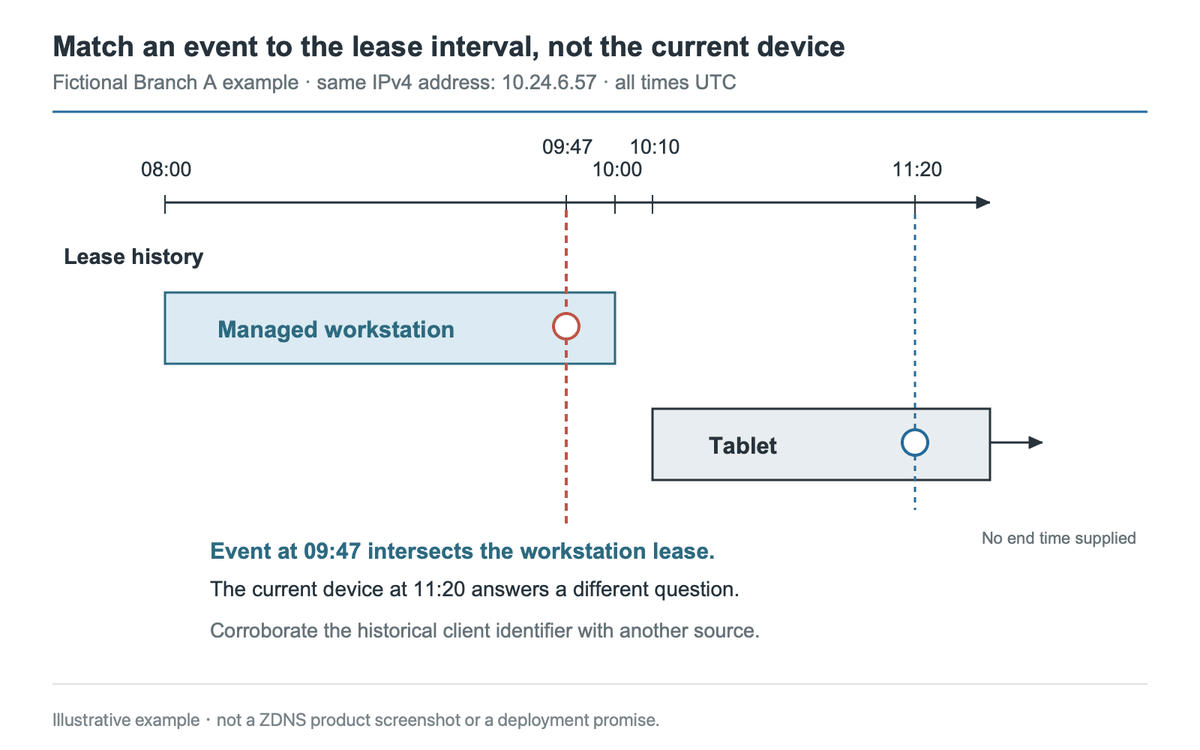
Fictional lease intervals for the article example. Corroborate the client identifier using another source; the current lease does not identify the device at the earlier event time. Click image to enlarge.
Now ask whether the workstation can be corroborated. The lease contains a client identifier. The branch access log connects that identifier to a workstation asset on the relevant segment at 09:45. You can record the workstation as the supported attribution and attach the two time-stamped references. If the access log covered a different segment, the lease would still be a lead, but the asset identification would remain open.
Capture enough detail so the next operator can repeat the IPv4 address lookup. Record the event time, network, address field, assignment interval, identifier type, corroborating observation and any gaps. A short record with its references is easier to verify later than a ticket that says only “found the user.”
Decide when to stop the lookup
Use a conclusion that matches the evidence. Record a device as identified when the event, network and assignment align and an independent source links the identifier to an asset. If the lease is valid but supporting records are missing, document the leading device and which check remains. An IPv4 address with no known network scope or historical assignment should stay unresolved until better evidence becomes available.
Questions about IPv4 address lookup
Can a public IP lookup identify an internal device?
A public lookup can add information about the address seen on the internet. For a specific internal device, you usually need records from the network or service where the event was observed. A gateway, translation layer or shared service can stand between that observation and the device.
What if the lease and asset record disagree?
Compare the event time with the lease history and the last update on the asset record. Check that both entries refer to the same network. Look for a second observation from the relevant time window and keep both records with the result. If the disagreement remains, identify the unresolved field explicitly so the next reviewer knows which system owner to consult.
How long should we keep DHCP history?
Set retention around your incident response needs, expected lookup delays and privacy obligations. A useful starting point is to ask how far back investigations usually look and what evidence they need to reproduce an attribution. Document which records survive a scope change and who can retrieve them.
For a repeatable IPv4 address lookup, preserve the original observation, use the assignment history for the correct network and write down the evidence that supports your conclusion.