
What Should You Know First?
- A full DHCP scope is an outcome, not a root cause. Prove that the client reaches the correct scope before changing capacity.
- Count usable addresses after active leases, reservations, exclusions, static assignments, and conflict-held addresses.
- Do not delete active leases at random. A client may still use an address after its server record is removed.
- ZDNS DHCP and IPAM connect utilization, transactions, endpoint identity, planning, discovery, and history into one capacity-control process.
A new endpoint sends DHCPDISCOVER. Nothing usable comes back. The user sees a spinning Wi-Fi icon or a 169.254.x.x address, and the first diagnosis is often "the DHCP scope is full." Sometimes that is correct. Sometimes the request never reached the intended server, the relay selected the wrong subnet, a failover peer has stale state, or conflict records have removed addresses from circulation.
The right response begins with evidence. ZDNS DHCP provides address-pool utilization, assigned-address visibility, transaction logs, real-time and historical IP information, and customizable endpoint fingerprint attributes. ZDNS IPAM adds address-space planning, discovery, utilization reports, and lifecycle history. Together, they help an operations team answer the question that matters: is the pool genuinely too small, or has its usable capacity been consumed for another reason?
What Is DHCP Scope Exhaustion?
DHCP scope exhaustion occurs when the applicable address pool has no safe address available for a new or renewing client. The important word is applicable. A DHCP server can manage many healthy scopes while one VLAN has no free addresses. It can also show unused addresses globally while the particular pool selected by a relay address, policy, or client class is empty.
Existing clients may continue working because they already hold valid leases. New arrivals fail first. That uneven pattern can send support teams toward wireless authentication, switching, or internet connectivity even though the failure sits inside the address-allocation process. The related ZDNS guide No DHCP Server Found Is a Network Evidence Problem explains why a missing offer must be traced across the client, access network, relay, server, and scope instead of being assigned to one device by assumption.
DHCP uses UDP ports 67 and 68, and Microsoft includes availability of leases, server bindings, relays, policies, BAD_ADDRESS records, and static-address exclusions in its troubleshooting checklist. That is a useful reminder: "no address" and "no capacity" are not synonyms.
How Do You Confirm the Scope Is Really Exhausted?
You confirm exhaustion by proving that a request reached the expected DHCP service, matched the expected scope, and failed because no assignable address remained. Start with one affected client and one timestamp. Find its transaction in the server log or packet capture. Then identify the relay address, VLAN, selected pool, policy, and failover state.
The DHCP exchange gives you a clean decision point. RFC 2131 defines the client-server sequence around DHCPDISCOVER, DHCPOFFER, DHCPREQUEST, and DHCPACK. If the server never sees DHCPDISCOVER, capacity is not yet the leading problem. If it sees the request and selects the wrong scope, fix the relay or policy context. If it selects the correct scope but cannot offer an address, inspect the pool state.
| Observed evidence | Likely direction | Next check |
|---|---|---|
| Client sends DHCPDISCOVER; server sees nothing | Access, VLAN, relay, firewall, or path issue | Trace UDP 67/68 through the relay path |
| Server sees request under the wrong scope | Relay address or policy selection error | Verify giaddr, VLAN, scope, and policy |
| Correct scope has zero assignable addresses | Confirmed capacity exhaustion | Classify every consumed address |
| Free addresses exist but offers fail | Conflict state, policy, failover, or server issue | Inspect logs, conflicts, peer state, and filters |
ZDNS DHCP transaction logs and pool visibility let the team connect the request to the selected scope and current capacity. That is faster and safer than expanding a range because a dashboard tile looks red.
How Many Addresses Are Actually Available?
Actual availability equals the configured dynamic range minus every address the server cannot safely allocate. Active leases are only one category. Reservations, exclusions, static assignments inside the range, abandoned or conflict-held addresses, and addresses owned by a failover partner can all reduce capacity.
Consider a /24 subnet. It contains 256 addresses, but the network and broadcast addresses are not host assignments, leaving 254 conventional host addresses. If the gateway and 13 infrastructure addresses are kept outside the dynamic pool, 20 addresses are reserved, 6 are held because of conflicts, and 190 active leases exist, the pool does not have 64 addresses available. It has 25. If new leases are arriving at ten per hour, the meaningful metric is not merely 90 percent utilization. It is roughly two and a half hours of remaining capacity at the current rate.
This is where DHCP and IPAM must agree. The DHCP database describes leases and configured exclusions. IPAM should describe the planned subnet, static ownership, reservations, discovered use, and historical changes. ZDNS IPAM supports planning, periodic discovery through methods such as ICMP and ARP, address status history, and reports on network and pool utilization. Reconcile those views before declaring an address free.
What Usually Consumes a DHCP Scope?
Most exhausted scopes fall into one of six patterns: legitimate growth, lease duration that does not match turnover, stale administrative records, unmanaged static use, abnormal client churn, or deliberate address consumption. Each pattern needs a different correction.
- Legitimate growth: More endpoints now use the subnet than the original plan allowed.
- Long lease retention: Departed guest or mobile devices keep addresses until their leases expire.
- Stale reservations and exclusions: Retired printers, access points, and temporary projects continue to remove addresses from the dynamic pool.
- Static overlap: Manually configured devices occupy addresses the DHCP server believes it can offer.
- Identifier churn: A faulty or privacy-changing endpoint appears as many clients and accumulates leases.
- Conflict or hostile activity: Repeated conflicts or synthetic client identifiers push otherwise usable addresses out of circulation.
Shortening the lease time can help a high-turnover guest network, but it is not an instant repair. Existing clients retain their current leases until renewal or expiration. Very short leases also increase renewal traffic. The separate guide DHCP Lease Time for Guest Wi-Fi explains how to relate pool size, visit duration, concurrency, and renewal load instead of copying a universal value.
Client behavior also matters during renewal. Cisco's DHCP documentation describes the default T2 rebind point as 7/8 of the lease time. A scope can therefore face a burst of renewals as well as new clients. Transaction history reveals whether pressure comes from steady onboarding, a predictable event peak, repeated retries, or one abnormal endpoint pattern.
How Can You Restore Service Without Causing IP Conflicts?
You restore service safely by creating verified capacity, not by making lease records disappear. Deleting an active lease from the server does not force the endpoint to stop using its address. If the server immediately reallocates that address, the recovery action can create a duplicate-IP incident.
| Recovery action | Speed | Conflict risk | Use when |
|---|---|---|---|
| Reclaim verified expired or obsolete state | Fast | Low after verification | History and discovery prove the address is unused |
| Correct conflict-held addresses | Medium | Low when root cause is removed | Static overlap or repeated conflict checks consumed capacity |
| Extend into a verified unused range | Medium | Low to medium | IPAM, routing, and discovery agree that the range is free |
| Shorten future lease duration | Gradual | Low | High-turnover clients retain addresses too long |
| Add a subnet or redesign segmentation | Slow | Controlled project risk | Sustained demand exceeds the address plan |
If an unused range exists, verify its gateway, routing, relay, DNS, security policy, and monitoring implications before adding it to the pool. If the subnet itself is undersized, expanding only the DHCP range cannot create host addresses beyond the subnet mask. A new VLAN or larger subnet may be the correct long-term fix.
How Does ZDNS Help Prevent Repeat Exhaustion?
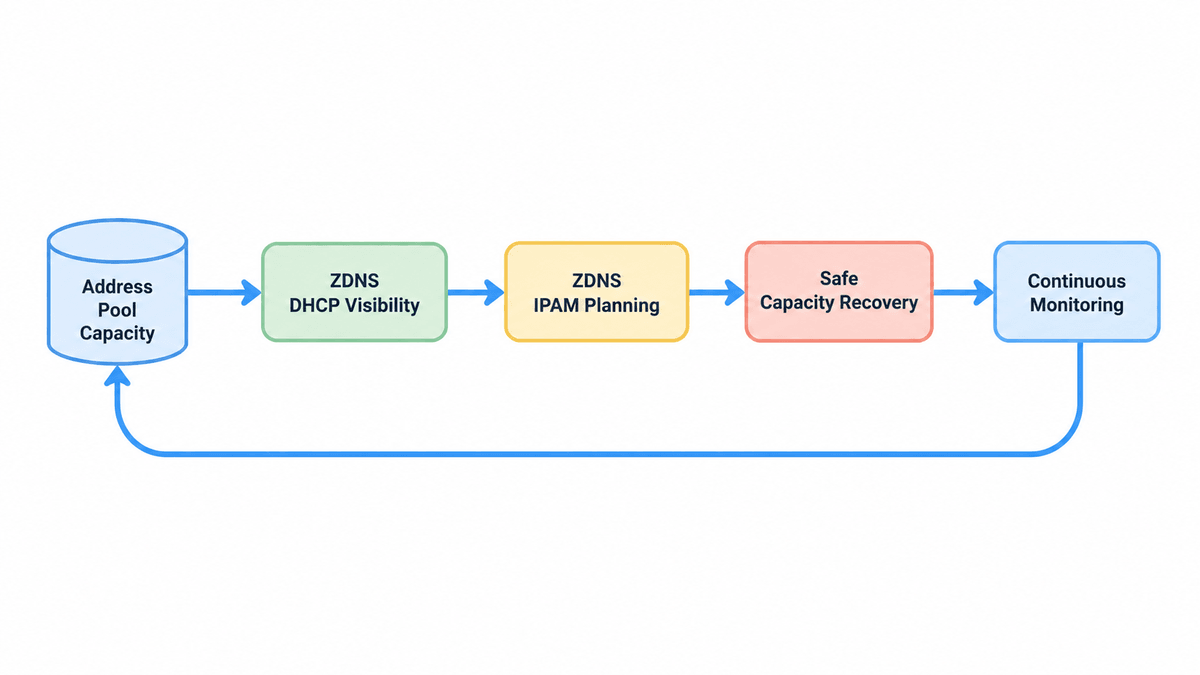
ZDNS helps prevent repeat exhaustion by connecting detection, diagnosis, controlled correction, and verification. ZDNS DHCP shows address-pool utilization, assigned addresses, DHCP transactions, and endpoint fingerprint attributes. Unified configuration management supports consistent changes across managed services. ZDNS states that its DHCP platform delivers over three times the performance improvement and cluster-level scalability for millions of addresses; those are vendor-published capabilities that buyers should validate against their own workload and architecture.
ZDNS IPAM adds the missing planning context. It supports visual address-space planning, dynamic and static allocation records, periodic discovery, lifecycle history, and scheduled utilization reporting. That combination makes it possible to see that a pool is filling, explain why, correct it, and confirm that the result persists.
The operating loop is simple:
- Detect: Alert on free-address count, utilization, lease failures, and demand velocity.
- Diagnose: Correlate transactions, assigned addresses, endpoint attributes, conflicts, and IPAM ownership.
- Correct: Reclaim verified stale capacity, repair overlap, adjust policy, or expand the address plan.
- Verify: Confirm successful offers, stable utilization, accurate ownership, and normal client behavior.
- Forecast: Use growth and turnover history to estimate time to exhaustion before the next peak.
This is the product value: not a generic promise to "automate DHCP," but a repeatable way to manage finite address capacity. The broader DHCP management operating model connects leases, options, identity, and failover; DHCP and IPAM address lifecycle guidance shows why allocation and authoritative address records must remain aligned. If a reclaimed or reassigned address drives name updates, ZDNS DNS and DDNS keep resolution data connected to the address lifecycle.
What Does a Real Scope-Exhaustion Response Look Like?
University open day: A guest Wi-Fi /22 normally has ample capacity, but thousands of short visits arrive in two waves. By noon, new guests cannot obtain addresses even though many morning visitors have left. Transaction logs show legitimate onboarding rather than identifier abuse. The team verifies expired leases, applies a shorter duration to future guest leases, adds a prevalidated range, and watches offer success and free-address velocity in ZDNS DHCP. After the event, ZDNS IPAM history supports a decision between permanent expansion and a dedicated event segment.
Quiet branch, full scope: A branch reports an exhausted /24 with fewer than 80 visible users. ZDNS DHCP and IPAM evidence shows old printer reservations, a migration exclusion block, manually configured devices inside the dynamic range, and conflict-held addresses. The team removes obsolete entries only after discovery and ownership checks, relocates infrastructure addresses into a documented static area, and reconciles the DHCP scope with the IPAM plan. No subnet expansion is needed because demand was never the main problem.
These scenarios need different remedies. One is a capacity and turnover problem. The other is address-space fragmentation. A utilization percentage alone cannot distinguish them.
Which Metrics Should Trigger an Early Warning?
The best warning combines remaining capacity with consumption speed. A fixed 80 percent threshold may be early for a stable office and far too late for a stadium network gaining hundreds of clients per minute.
- Absolute free addresses: The count of addresses that can be safely offered now.
- Utilization percentage: Useful for comparison, but never read without pool size.
- New-lease velocity: How quickly the pool is consuming addresses during normal and peak periods.
- Lease failure rate: Failed allocation attempts can reveal trouble before the pool reaches a displayed 100 percent.
- Conflict-held or abandoned addresses: A rising count suggests overlap, faulty clients, or another operational problem.
- Time to exhaustion: Free addresses divided by current net consumption rate, adjusted for expected expirations.
Set separate policies by network role. Guest Wi-Fi, office endpoints, phones, lab equipment, and infrastructure devices have different turnover and risk. ZDNS reporting and DHCP visibility support that scoped approach better than one global threshold.
What Do Network Teams Ask About DHCP Scope Exhaustion?
Why is a DHCP scope full when only a few devices are online?
A scope can be full because leases outlive device sessions, reservations and exclusions remove addresses, static devices overlap the dynamic range, or conflicts hold addresses back. Count each category and compare DHCP state with IPAM discovery. Online-device count alone does not represent the pool's safe, assignable capacity.
Can shortening the lease time fix an exhausted DHCP scope immediately?
No. A shorter duration mainly affects new leases and later renewals; it does not instantly cancel every lease already issued. It helps when client turnover is high and the current duration retains departed devices too long. During an outage, pair the change with verified reclamation or validated additional capacity.
Is it safe to delete active DHCP leases to free addresses?
Not without proving the clients have stopped using them. Removing a server record does not remove the address from an endpoint, so immediate reallocation can create duplicate IPs. Reclaim expired or obsolete state only after checking transaction history, endpoint activity, address discovery, and the organization's approved incident procedure.
How can I tell scope exhaustion from a relay or VLAN problem?
Trace one failed request. If DHCPDISCOVER never reaches the server, investigate the access network, VLAN, relay, firewall, or routing path. If the server receives it under the wrong scope, inspect relay and policy selection. Exhaustion is confirmed only when the correct scope has no assignable address.
What should I monitor before a DHCP scope runs out?
Monitor absolute free addresses, utilization percentage, lease creation velocity, failed allocations, conflict-held addresses, reservation and exclusion growth, and estimated time to exhaustion. Alert thresholds should reflect each network's pool size and peak demand. ZDNS DHCP and IPAM supply the operational and planning context needed for that calculation.
DHCP scope exhaustion should not be managed as a recurring emergency. Preserve the transaction evidence, calculate real capacity, restore only verified addresses, and fix the condition that consumed the pool. ZDNS turns that response into an ongoing DHCP and IPAM practice, giving network teams the visibility and history needed to act before the next client loses access.