
What Should You Know First?
- Guest Wi-Fi lease time should follow visitor dwell time, concurrent devices, usable pool size, and renewal capacity.
- A shorter lease returns departed-device addresses sooner, but it also makes clients renew more often.
- Start with a measured profile, then validate it during the venue's real peak rather than copying a vendor default.
- ZDNS DHCP and IPAM provide utilization, transaction, endpoint, and history data for that tuning cycle.
The practical rule is simple: the lease should be long enough to avoid needless renewal traffic but short enough to return addresses soon after the typical guest leaves.
The right DHCP lease time for guest Wi-Fi is not a universal number. A cafe, hospital waiting area, university residence, conference venue, airport lounge, and stadium all have different session lengths, return patterns, concurrent-device counts, and available address space. A lease that is harmless in a quiet office can exhaust a guest scope during a high-turnover event. A very short lease may recycle addresses sooner, but it also produces more renewals and gives the DHCP service less tolerance during an interruption.
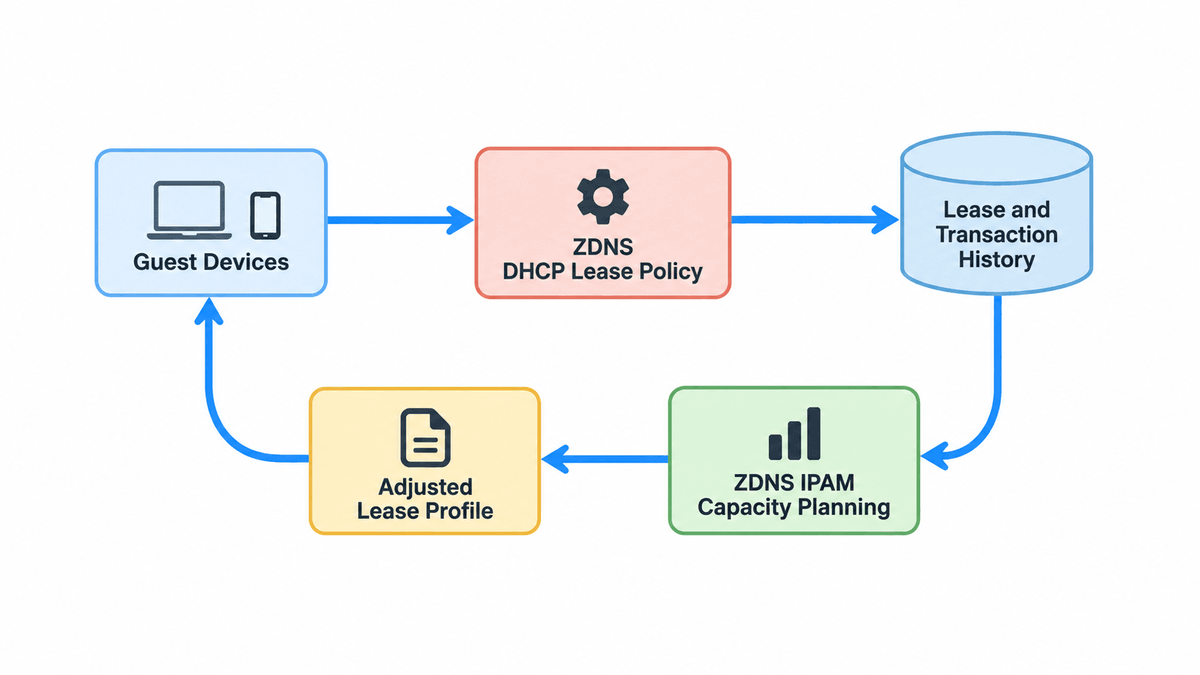
ZDNS DHCP supports real-time and historical IP visibility, address-pool utilization, assigned-address visibility, transaction logs, temporary guest usage periods, and automatic expiration of address allocation when authorization ends. Those capabilities allow teams to choose an initial lease policy and then validate it against actual guest behavior. ZDNS IPAM adds utilization reporting and address-space planning when the underlying subnet, rather than the lease time, is the real constraint. ZDNS DNS is relevant because the guest lease also needs to deliver reachable resolver settings that match the guest network policy.
Why Does Guest Wi-Fi Need a Different Lease Policy?
Corporate wired endpoints often return every day, stay connected for long periods, and renew an existing address. Guest devices are less predictable. A visitor may connect a phone, tablet, and laptop, remain for twenty minutes, and leave without sending DHCPRELEASE. The server must retain each address until its lease expires. In a busy venue, yesterday's or this morning's departed clients can consume enough of a small IPv4 scope to prevent current visitors from connecting.
That does not mean every guest network should use the shortest possible lease. DHCP clients normally try to renew before expiration. Under the defaults described by RFC 2131, renewal begins around half of the lease duration and rebinding begins later if the original server does not answer. Short leases therefore increase DHCP exchanges. If the service, relay path, or wireless network is interrupted, clients reach their renewal and expiration points sooner. Lease design must balance address reuse, control-plane load, and service resilience.
How Do You Estimate Guests, Turnover, and Pool Size?
Begin with a simple demand model. Count the usable dynamic addresses after removing network infrastructure, exclusions, reservations, and any static allocations. Estimate peak concurrent visitors, not daily footfall alone, then multiply by the average number of connected devices per visitor. Add staff, kiosks, scanners, event equipment, and other devices if they share the scope. Finally, account for departed clients whose leases remain valid. That last group is where lease duration has the greatest effect.
A practical baseline uses observed data from comparable days. ZDNS DHCP transaction logs can show when new leases arrive, how often clients renew, and whether demand is concentrated around event start times. Pool-utilization history shows how much headroom remains at the peak. If the network has not yet opened, run a pilot or simulate arrival waves instead of relying only on venue capacity. The calculation should produce a range of plausible demand, including an unusually busy period, rather than a single optimistic estimate.
- Usable dynamic addresses after exclusions and reservations
- Peak simultaneous visitors and devices per visitor
- Average and upper-bound guest session length
- Arrival waves, breaks, shift changes, and event turnover
- Expected renewal traffic and DHCP server capacity
- Required headroom for demand spikes and troubleshooting
How Do You Balance Address Reuse and Renewal Traffic?
A shorter lease returns addresses from departed clients sooner, but the benefit depends on how quickly guests actually leave. Reducing a twenty-four-hour lease to four hours can transform capacity in a venue where most visits last ninety minutes. Reducing a two-hour lease to fifteen minutes may add substantial renewal traffic while gaining little if guests remain connected for several hours. The useful question is how long an address remains unavailable after the typical device has gone.
Consider service continuity as well. If a client cannot renew at T1, it can continue using the current lease and later try to rebind. A longer remaining lease gives operations more time to restore a failed server or relay path. ZDNS DHCP offers HA and failover mechanisms, dual-node load sharing, automatic lease synchronization, and automatic fault failover, but lease duration should still provide a reasonable recovery window. High availability and lease policy reinforce each other; one should not be used to excuse a fragile setting in the other.
Which Initial Lease Range Fits Each Venue?
Use venue behavior to establish the first test range. A short-stay event network with thousands of transient devices usually needs a shorter lease than a hotel, residence hall, or long-duration contractor network. A clinic waiting room may see steady turnover but modest concurrency. A conference may have sharp morning arrivals, lunch departures, and afternoon reconnections. Start with a lease comfortably longer than the expected continuous session but short enough to reclaim departed clients before the next major arrival wave.
Avoid publishing one exact value as a rule for every network. The same one-hour lease can be appropriate for a high-turnover event and unnecessarily aggressive for a quiet guest lobby. Document why the selected duration fits the pool size, session pattern, and continuity requirement. Also define the condition that will trigger a change, such as free addresses falling below a set count, renewal traffic rising beyond normal capacity, or guests frequently losing connectivity after brief network interruptions.
Which Lease Profile Should You Test First?
No duration is a protocol requirement. These profiles are pilot values that must be checked against observed occupancy and renewal traffic. Infoblox documents defaults ranging from 6 hours for ISC DHCP to 8 days for Windows Server 2019, which shows why a software default is not a venue design.
| Environment | Pilot range | Main evidence | Failure signal |
|---|---|---|---|
| Short conference sessions | 1-4 hours | Session length and arrival waves | Addresses remain occupied between sessions |
| Office guest network | 4-12 hours | Working-day dwell time | Morning pool pressure or excess renewals |
| Hospital or hotel visitors | 8-24 hours | Long visits and overnight stays | Reauthentication or renewal interrupts sessions |
| Very high-turnover public venue | 30-120 minutes | Peak arrivals and free-address velocity | Renewal traffic rises without enough reuse benefit |
RFC 2131 places the default renewal point T1 at half of the lease and the rebinding point T2 at 87.5 percent when values are not supplied. A two-hour lease can therefore prompt renewal after roughly one hour. Test the server, relay, and wireless path under that additional request rate.
How Do You Validate the Setting with ZDNS DHCP Data?
After deployment, observe at least one representative peak. Track maximum utilization, lowest free-address count, new leases per minute, renewals, failed allocations, and the age distribution of active leases. Compare these measurements with the expected guest population. If utilization remains high after visitors leave, the lease may still be too long or devices may be reconnecting with new identifiers. If server and relay traffic rises sharply without improving capacity, the lease may be unnecessarily short.
Endpoint fingerprint attributes can add useful context by showing whether the population matches expected mobile and guest devices. DHCP transaction logs help separate normal renewals from repeated discovery behavior. Historical IP information makes it possible to compare event days, weekdays, and quiet periods. The policy should be changed from evidence, not from a single complaint. A stable configuration is one that maintains headroom across real peaks while keeping renewal and support load predictable.
Should DHCP Lease Expiry Match Guest Authorization?
An IP lease and permission to use the network are related but not identical. A guest can hold a valid lease after a portal session expires, or receive a renewed address while authorization is handled by another system. ZDNS DHCP supports manual and portal-based authorization, temporary usage periods for guests, and stopping address allocation upon expiration. Aligning these controls reduces the chance that the addressing layer and guest-access policy operate on incompatible timelines.
Choose the authorization duration according to business policy and the DHCP lease according to address and continuity needs, then test their interaction. Verify what happens when a guest session expires, when an approved guest renews, when the same device returns later, and when a visitor uses more than one endpoint. Do not shorten the DHCP lease merely to imitate an access-control timeout. Instead, define the intended state at each layer and confirm that expired guests cannot continue receiving service unintentionally.
How Should a Conference Handle Two Daily Demand Peaks?
A conference center expects 1,200 attendees, many with two devices. The largest address scope can support the audience, but arrivals concentrate before the keynote and after lunch. Historical events show that many morning-only visitors leave without releasing their addresses. The team selects a lease that covers a typical session but expires before the next day's arrivals, then uses ZDNS DHCP utilization and transaction data to watch the morning peak, lunch turnover, and afternoon reconnections.
During the pilot, free addresses remain healthy, but renewal traffic rises during the keynote. The team slightly lengthens the lease and confirms that enough addresses are still reclaimed before the next arrival wave. Temporary guest authorization expires independently at the end of the event. This iterative adjustment produces a setting tied to observed occupancy, not an arbitrary industry number.
How Should a Hospital Handle Longer Guest Visits?
A hospital guest network serves waiting rooms, patient visitors, and family members who may remain for many hours. A lease copied from a stadium deployment causes frequent renewals and makes brief infrastructure disruptions more noticeable. The pool has sufficient space, so the team chooses a longer guest lease, retains utilization alerts, and separates clinical and managed devices from the guest scope. ZDNS DHCP visibility confirms that the longer duration does not threaten capacity.
The hospital also reviews guest authorization and privacy requirements separately from address leasing. It tests overnight visitors, devices that sleep and reconnect, and busy clinic periods. The result is a policy that favors continuity where turnover is slower while preserving enough reporting to detect unexpected growth. The correct lease is the one that fits this environment's demand and recovery needs.
When Should You Change the Lease or Expand the Subnet?
- Shorten the lease when departed clients retain scarce addresses through the next arrival wave.
- Lengthen it when renewals are excessive and the pool consistently has ample headroom.
- Expand or redesign the subnet when legitimate concurrency approaches usable capacity even after tuning.
- Investigate identifier churn when one physical population creates far more leases than expected.
- Revisit exclusions and reservations before adding address space.
- Retest after venue schedules, Wi-Fi designs, or guest authorization policies change.
There is no permanent best DHCP lease time for guest Wi-Fi. The defensible approach is to size the pool, understand visitor turnover, select a safe starting range, and measure the result. ZDNS provides the DHCP and IPAM visibility needed to keep that decision connected to real address use. When demand changes, the team can adjust the lease or the network design with evidence instead of waiting for guests to discover the limit.
What Do Network Teams Ask About Guest Wi-Fi Lease Time?
What is a good DHCP lease time for guest Wi-Fi?
There is no universal value. A practical pilot often starts between one and four hours for busy guest networks, then changes according to actual dwell time, pool size, and renewal load. A hotel, hospital, office lobby, and conference floor should not inherit the same setting merely because they all offer guest access.
Should the lease equal the captive-portal session timeout?
No. The DHCP lease controls address retention, while the portal timeout controls authorization. They may be coordinated, but they solve different problems. A guest can remain authorized while renewing the same address, or retain a lease after authorization expires. Test both timers as one user journey without treating them as one control.
Can a very short lease prevent address exhaustion?
It can return addresses sooner after visitors leave, but it cannot compensate for a pool that is smaller than peak concurrent demand. Very short leases also increase renewals and make DHCP availability more important. Measure free-address count and request volume during the busiest period before deciding that a shorter duration is the complete fix.
Why do phones leave so many active guest leases?
Mobile devices often leave without sending DHCPRELEASE, so the server keeps each address until its lease expires. MAC randomization or changing client identifiers can also make one physical device appear as several clients over time. Transaction history and endpoint attributes help separate normal turnover from unusual identifier churn or misconfiguration.
How often should a guest Wi-Fi lease policy be reviewed?
Review it after venue changes, major events, subnet changes, access-policy updates, or sustained shifts in visitor volume. At minimum, compare peak utilization, free-address count, renewal rate, and allocation failures on a regular reporting cycle. ZDNS DHCP and IPAM data make the review evidence-based instead of calendar-driven guesswork.